LD2040 DC CONTROLLER
FOR REED SWITCHES

INSTALLATION INSTRUCTIONS & TROUBLESHOOTING
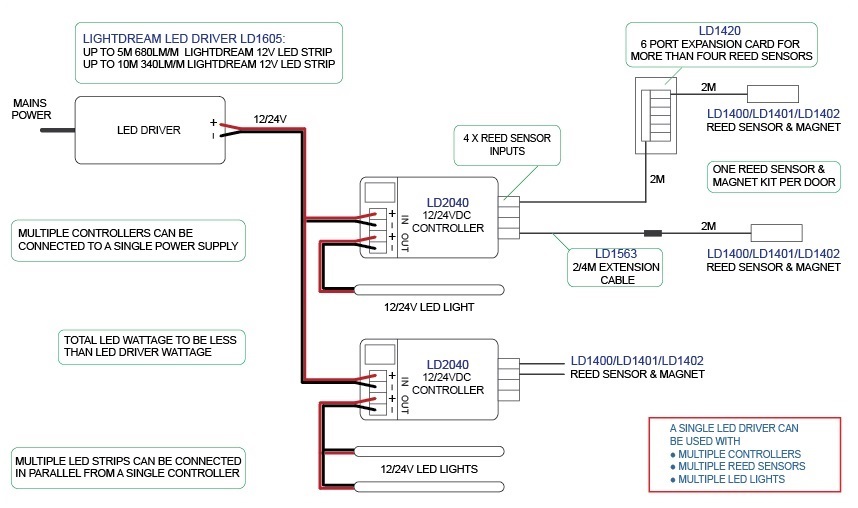
CONNECTING POWER
1. Slide off the terminal cover.
2. Connect power either by:
a) plugging in a 12/24VDC power adapter
OR
b) hardwire directly from a 12/24VDC LED driver to the screw terminals marked “INPUT”.
3. Connect the LED light using the screw terminals marked “OUTPUT” (5A max).
CONNECTING THE REED SWITCHES
1. Remove a jumper on one of the four inputs and plug in the first reed switch. Plug is non-polarized so can be plugged in either way.
2. Repeat for additional reed switches with jumpers to remain on unused inputs.
3. When installed ensure there are no other magnetic sources within 150mm of the reed switches.
POWER ADAPTER CONNECTIONS

LED DRIVER CONNECTIONS
TROUBLESHOOTING
- Is there a reed switch or a jumper plugged in on all four inputs?
- Are there any magnetic door catches in close proximity to the reed switches?
- Is polarity correct for input and output power?
- Connect the LED light directly to the power supply and check if working ok?
- To test the controller, disconnect all reed switches and plug in all three jumpers supplied. Using a small screwdriver short out the remaining input pins. The LED light should now be off which means controller is operating correctly.
- Connect one reed switch at a time and test leaving the three jumpers on the other inputs.
- Are the magnets in the doors? – check with metallic object.
- Contact Lightdream Technical Support by phone or email for additional assistance.
SPECIFICATIONS
Designed for 12 & 24V LED strip
Voltage: 12 & 24VDC
Load current (max): 5A
Reed sensor inputs: 4