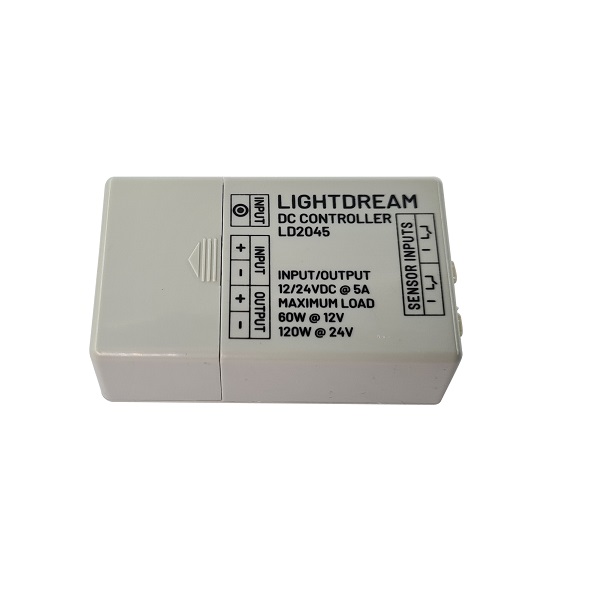
DC Controller For Up To Two Touch Sensors or Remote Button
- Connect up to a total of two or combination of touch sensors or wireless dongles
- Touch or press the button to turn on, touch or press the button to turn off
- Light level can be controlled via prolonged input or set with the onboard dial
- approximately 5 sec fade-in/fade-out
- Multiple uses – TV cabinets, display lighting, shelf lighting, cabinets with glass doors
- Turn task lighting into ambient lighting just by dimming
For use with Lightdream touch sensors or wireless dongle LD2083. Up to two touch switches or two wireless dongles can be connected or one of each. Set maximum light level either by prolonged pressing of the remote button or continuing to touch the touch sensor. Setting the maximum light level can also be achieved by using the onboard dial.
Add-ons include
- 2m extension cables for the touch sensor LD1565
- Splitter cables to allow multiple controllers to connect to a single DC power source LD1562
Technical
- Dimming from 0 – 100%.
- Fade-in/fade-out fixed at around 5 seconds.
- Input power can be either from a power adapter using the plug socket
OR
hardwire directly from a 12V or 24V LED Driver using the terminals marked INPUT. - Input/Output Power: 12/24VDC @ 5A, maximum LED load 60W @ 12V or 120W @ 24V.
- For use in conjunction with Lightdream PIR sensors, LD1412.
LD2052
| Input/Output Voltage | 12/24VDC |
| Max Load @ 12V | 60W |
| Max Load @ 24V | 120W |
| Max Current | 5A |
| Switch Method | solid-state |
| Sensor Inputs | 2 |
| Dimensions | 39x65x22mm |
| Warranty | 5 years |